
Make every stage of your renovation visible
From bare concrete or strip-out to services, finishes and handover. Show clients the work, request decisions and keep the project story in one private feed.
The client sees unfinished walls. You see weeks of skilled work.
New wiring, pipework, floor preparation and waterproofing take time. If the only update is a phone call, the client can miss the value of everything your team has done.
Explain the progressShow what changed today and what comes next, without repeating the same update on every call.
Keep the contextKeep site photos, explanations and client responses together in the project.
Show your standardsMake careful preparation and hidden services visible before the next layer covers them.
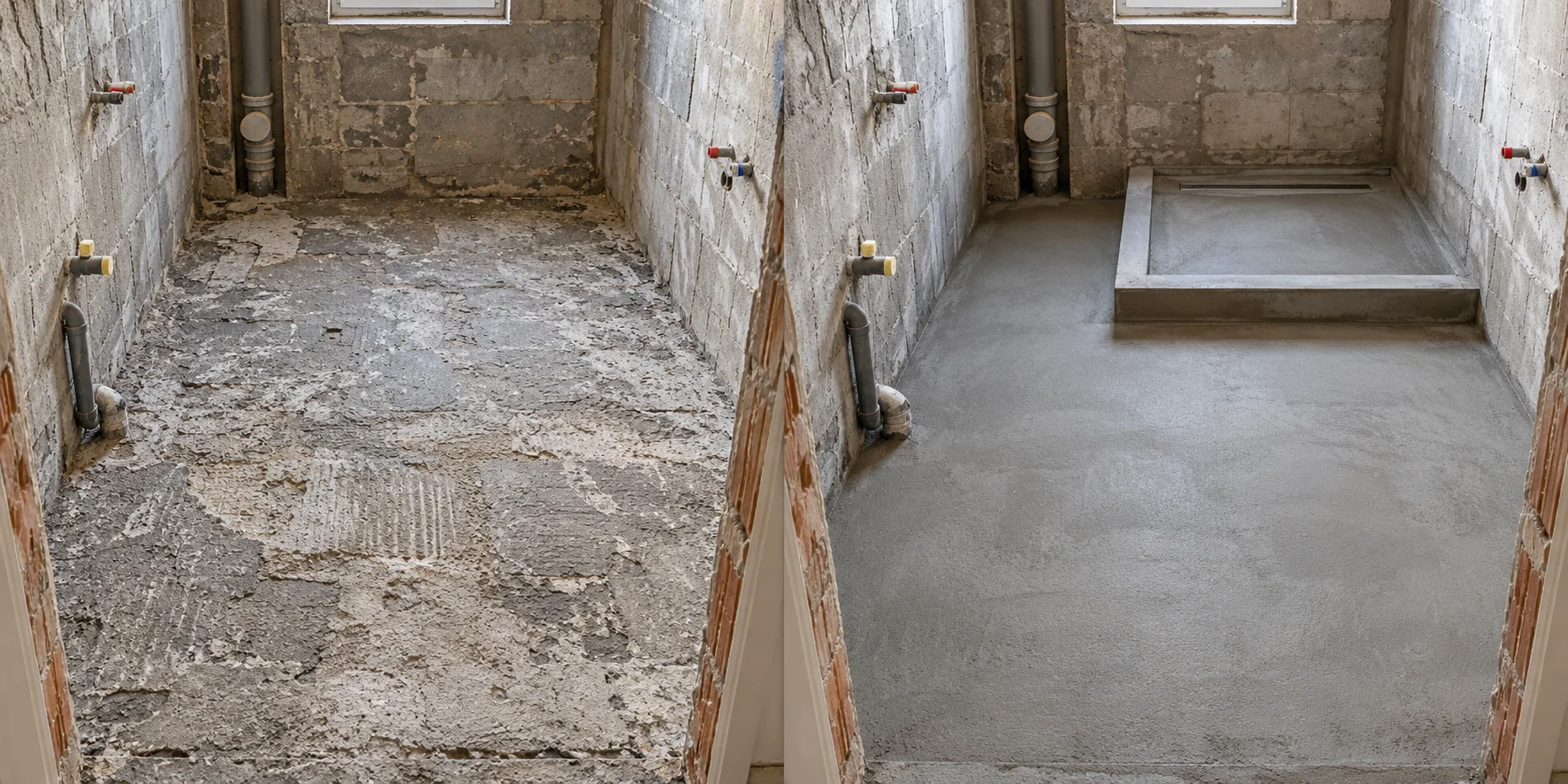
Bathroom floor preparation complete
The old floor has been stripped out, the base levelled and the concrete shower tray formed. Next: waterproofing, checks and tile installation.
Show the progress between the big milestones
A finished apartment is only the final chapter. Compare a single room or work stage so the client understands what has changed along the way.
Here: a bathroom floor after demolition, then a prepared base with a formed concrete shower tray. Both views are mid-renovation, before tiling.
Drag the divider with your finger or mouse
Ask for a clear decision before the next step
Attach a photo, explain the choice and publish an approval request. The client can approve it or reject it with a reason directly in the project feed.
The response stays with the request, so the team can return to the decision and its context.
Confirm the position
The marked position follows the agreed layout. Please confirm before we form the shower tray.
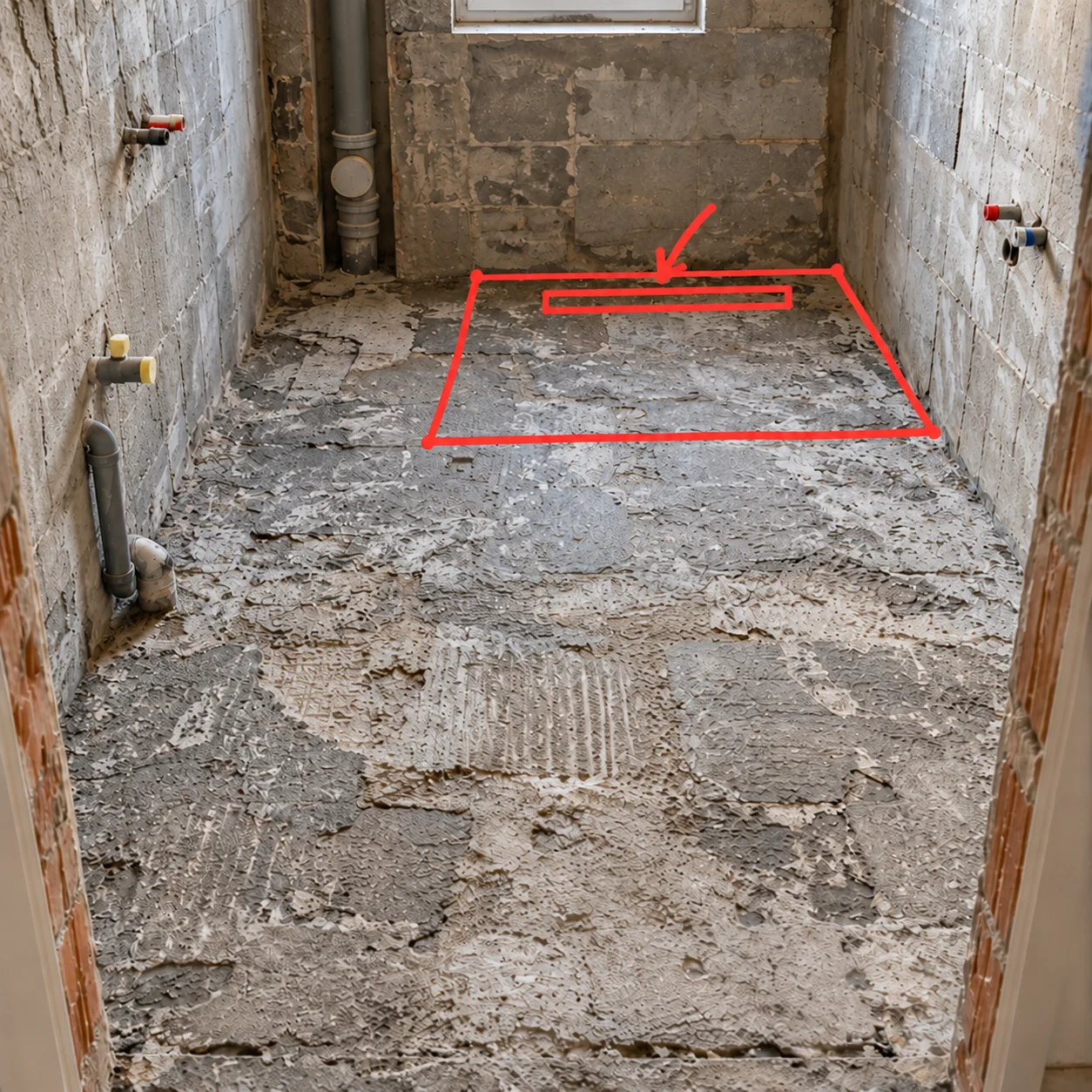 Try the example buttons — this does not affect a real project.
Make the next steps easy to follow
Add a checklist to the project description. Your team ticks items off as the work moves forward, and the client can see the current state.
Use it for the renovation stages, a room or preparation before handover. Add photo posts when an item needs a visual explanation.
Bathroom · Next steps
One feed for the work, the details and the decisions
Use a regular post for the everyday update. Add comparisons, checklists or approval requests when the stage calls for more.
Photos, video and audio
Show cable routes before plastering, record a room walkthrough or leave a short voice explanation.
Client email updates
Once the client confirms their email, new client-facing posts can bring them back to the project feed.
Team posts and internal notes
Give employees access to publish from site. Choose which posts appear in the client feed and which stay internal.
A link for each project
Send the client their project link and PIN separately. Use a project QR code to reach the posting form quickly.
Your renovation history, all in one place
Photos, videos, decisions and working notes stay with the project. Your company or independent practice can return to any stage and recover the context.
Return to the stage you needReview installation progress, see what was there before the finishes and revisit decisions made along the way.
Keep working notes internalAdd notes for yourself and your team, including details the client does not need to see.
Control visibility for every postSwitch client visibility on or off. Internal posts are available only to your company team.
Bathroom floor preparation complete
Photos of the base and concrete shower tray are saved before the next stage.
Check joints before painting
Working note: inspect the joint by the doorway and add photos after the touch-up.
Only you and your team can see this post.
A professional client experience at any team size
Company owners
See how your teams document progress across apartments. Give each client a consistent way to follow their renovation.
Foremen and site supervisors
Publish once from site. Keep stage updates, photos and client decisions together for the people who need them.
Independent specialists
Show the care behind your work with a clear project feed, even when you handle both the site work and client communication.
Your next site update can be the first post
Keep your existing estimating, scheduling and accounting tools. Add a simple place for clients to follow the work.
Add a project
Add the scope, client contact and a checklist of the main stages.
Publish your first update
Start with the current condition, a few photos and a short explanation of the next step.
Share client access
Send the private project link and PIN. Clients use their browser; email updates start after email confirmation.
Keep the story moving
Add posts, before/after comparisons and approval requests through services, finishes and handover.
Frequently asked questions
Is this for full renovations, including electrical and plumbing work?
Yes. Use the feed from bare concrete or demolition through electrical, plumbing, heating, ventilation, floor preparation, waterproofing and final finishes. Each update gives the client context for the current stage.
Is it useful if I work alone?
Yes. You can start with one apartment and publish updates yourself. Add employees when more people need to post from site.
Does the client need an account or an app?
The client opens a project link in a browser. Private feeds use a PIN; you can also enable public access for a project when appropriate.
What can the client do with an approval request?
The client can approve or reject the request. A rejection requires a reason, which remains attached to the post.
Can we keep some posts internal?
Yes. You choose whether each post appears in the client feed. Internal posts remain available to your company team.
How can we try it?
Start with your first project for free or open the demo to explore the workflow before creating your own project.
Set up your first project in 2 minutes
Try every CustomWorks feature. One team member and one project are free with no time limit.