Client Project Update Software That Works
Silence is expensive when a client has already paid and the work will take weeks or months. If they cannot see progress, they start filling the gaps themselves. That usually means status messages, follow-up calls, repeated questions, and growing doubt. Client project update software exists to prevent that pattern before it becomes part of your workflow.
For companies running custom builds, renovations, fabrication jobs, installations, or other long-duration projects, the real communication problem is rarely a lack of effort. It is fragmentation. One photo is in WhatsApp, an approval is buried in email, a key decision happened on a call, and the latest timeline update lives in someone’s head. The client experiences that as uncertainty. Your team experiences it as interruption.
CustomWorks.app
Keep clients updated without messy chats
Give each project a private feed for client updates — and keep a clear history of photos, videos, notes, stages, decisions, and delivery moments for your team.
What client project update software should actually solve
A lot of tools claim to improve communication, but many of them were built for internal coordination, not for client confidence. That distinction matters. Your team may need tasks, dependencies, budgets, and resource planning. Your client usually does not. They want a simple answer to one question: is the project moving forward as expected?
Good client project update software gives them a clean, professional way to see that answer. It should show visible progress over time through photos, videos, short notes, milestones, key decisions, and handoff moments. It should not force them into a full project management system just to understand what happened this week.
That is the trade-off many businesses miss. If the tool is too light, updates stay inconsistent and trust still drops. If the tool is too heavy, clients avoid it, your team resists using it, and communication slides back into messaging apps. The best fit sits in the middle: enough structure to create clarity, not so much structure that it creates admin work.
Why status requests keep piling up
Most repeated status questions are not really about status. They are about reassurance.
When a client prepays for a custom kitchen, a fit-out, a restoration job, or a specialty fabrication project, they are taking on uncertainty. They cannot inspect progress every day. They do not know which delays are normal and which are a warning sign. If they hear nothing, they assume risk. So they ask for updates more often, and each request pulls someone from delivery into explanation.
This is why client communication tends to break down in otherwise well-run businesses. The team is busy doing the work, but the client only sees the gaps between messages. A project can be on track internally and still feel unstable externally.
Client project update software closes that gap by replacing sporadic reassurance with a visible record. Instead of answering the same question ten times, your team maintains one clear timeline that shows what was done, what changed, and where the project stands now.
The difference between update software and project management software
This is where many companies make the wrong purchase.
A project management platform is designed to help teams run projects. A client update platform is designed to help clients understand projects. Those are related jobs, but they are not the same.
Project management tools often expose too much. Clients see task lists they do not understand, internal comments they do not need, or process detail that creates confusion instead of confidence. On the other side, messaging apps feel easy at first, but they do not create an organized project history. Important photos disappear into chat threads. Decisions get lost. New team members have no reliable record to review.
A dedicated client-facing update system keeps the view focused. It presents progress in a way that makes sense to the customer without turning the customer into a project coordinator. That is especially useful for businesses where the work is physical, visual, and staged over time.
What to look for in client project update software
The first requirement is a private project feed or timeline. Clients should be able to open one place and immediately understand what happened recently and how the work is progressing. If they need to search across channels, the tool is not solving the core problem.
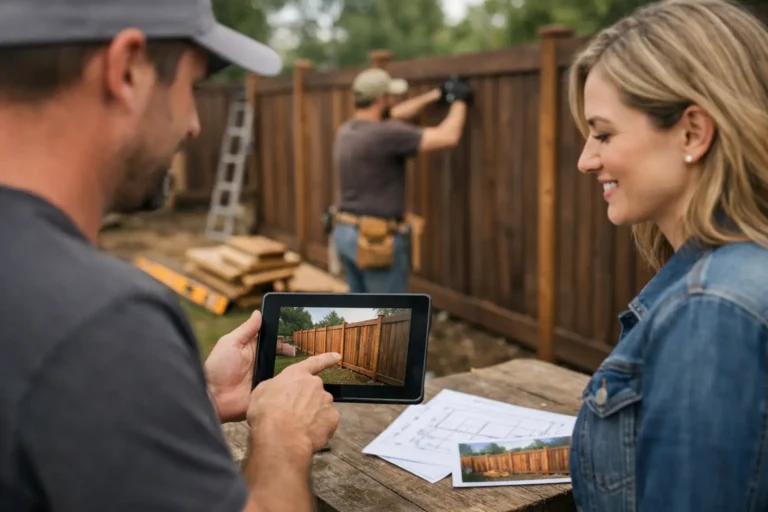
The second requirement is support for real proof of work. Photos matter. Videos matter. Short notes matter. Milestones matter. In long custom projects, trust grows when clients can see tangible movement, not just read generic status text.
The third requirement is simplicity for both sides. Your team should be able to publish updates quickly from the field, the workshop, or the office. Your client should not need onboarding, training, or a manual. If posting an update feels like extra admin, adoption will be weak.
The fourth requirement is chronology. Updates should build a reliable record from kickoff to delivery. That record becomes useful beyond communication. It helps with handovers, approvals, dispute prevention, and internal continuity when staff changes mid-project.
Finally, the tool should look professional. For many small and mid-sized firms, the update experience shapes how organized the business appears. A clear, structured project history makes your company look more controlled and dependable than scattered message threads ever will.
Where this matters most
Client project update software is not equally valuable in every business model. If you deliver short, transactional work in a day or two, it may be unnecessary. But for projects with lead times, production stages, site work, revisions, or installation windows, it becomes much more relevant.
Furniture makers can show material selection, fabrication progress, finishing, and assembly. Contractors can document site prep, structural work, inspections, and closeout stages. Designers and fit-out teams can share approvals, mockups, progress photos, and install milestones. Restoration specialists can record condition findings, repair steps, and completion details. In all of these cases, the client wants confidence without needing to manage the job themselves.
This is also where visual history becomes commercially useful. A well-documented project often reduces friction at invoicing, change discussions, and final handoff because the journey is visible, not debatable.
How to start without adding more process
The mistake is trying to create a publishing department around updates. You do not need that. What you need is a repeatable operating habit.
Start with one live project. Choose a job where the client is likely to want regular visibility and where your team already captures some photos or notes. Set a simple rhythm. For example, publish an update at every meaningful stage, after major decisions, and whenever visible progress occurs. Keep the format short: what was completed, what the client should know, and a photo or video that proves movement.
Do not wait for perfect wording. Clarity beats polish. Most clients are not looking for a presentation. They are looking for confirmation that the project is active, organized, and under control.
This is one reason a focused platform like CustomWorks can be easier to adopt than a broader system. It keeps the process centered on client visibility rather than internal complexity.
Common objections, and when they are valid
Some teams worry that more visibility means more scrutiny. Sometimes that is true. If your process is disorganized, making progress visible can expose inconsistency. But that is not a software problem. It is a process signal. In healthier operations, visibility usually reduces friction because clients stop inventing worst-case scenarios.
Others assume updates will consume too much time. That depends on how the tool is used. If every post requires long writing, formatting, and approvals, yes, it becomes a burden. If updates are lightweight and tied to natural project moments, they typically save more time than they cost by reducing repeat inquiries.
There is also a fair concern about over-sharing. Not every internal issue belongs in the client view. Good client project update software should help teams present the right level of transparency: honest, current, and useful, without exposing every internal detail.
The business impact is bigger than fewer messages
Reducing status requests is the obvious win, but not the only one.
A better update process changes how clients perceive wait time. Long projects feel shorter when there is visible movement. It improves handoff because the completed work has a documented history. It supports trust during delays because communication already exists before problems happen. And it gives your business a more professional operating layer without forcing clients into complicated software.
That matters for referrals and repeat work. Clients remember how informed they felt while waiting. They may forget the exact install date or production sequence, but they remember whether the process felt controlled or chaotic.
If your projects take time, and your clients pay before the final result exists, communication is not a side task. It is part of delivery. The right client project update software makes that visible, consistent, and easier to manage – which is exactly what clients need when the work is still in progress.