Client Progress Updates That Build Trust
Silence is expensive on a long-running project. A client pays a deposit, waits two weeks, sees no visible movement from their side, and starts asking the same question in different ways: Any updates? Is everything on track? When can I expect the next stage? That pressure usually does not come from difficult clients. It comes from a lack of clear client progress updates.
For companies handling renovations, fit-outs, custom builds, fabrication, restoration, or bespoke production, this is a communication problem with real operational cost. Every repeated status request pulls time from delivery. Every photo buried in a personal chat creates risk. Every decision hidden in an email thread makes the project harder to manage. Good client progress updates fix more than communication. They protect trust while the work is still in motion.
CustomWorks.app
Keep clients updated without messy chats
Give each project a private feed for client updates — and keep a clear history of photos, videos, notes, stages, decisions, and delivery moments for your team.
Why client progress updates matter more on custom work
Long projects create uncertainty by default. Unlike buying a standard product, the client cannot always see what is happening, what has been completed, or what is causing a delay. Even when your team is working steadily, the client experience can still feel like waiting in the dark.
That gap between actual progress and visible progress is where anxiety starts. Once a client feels uninformed, they often increase the number of calls, messages, and emails. The team responds reactively, often from memory, and communication becomes fragmented. One person sends site photos on WhatsApp, another confirms a change by email, and someone else mentions a delay in a phone call that no one records properly.
This is why client progress updates are not a nice extra for custom project businesses. They are part of delivery. They help clients see movement, understand decisions, and stay aligned without needing constant reassurance from your team.
What good client progress updates actually look like
A useful update is not a polished report. It is a clear, timely record of what changed and what the client needs to know. In practice, that usually means sharing visual proof of progress, a short explanation, and enough context to avoid follow-up questions.
Photos are often the fastest way to show progress, especially in construction, joinery, manufacturing, interiors, and restoration. Video helps when a result is easier to understand in motion or when the client needs a walkthrough. Short notes matter because visuals alone do not explain whether something is finished, awaiting approval, or being redone.
The best updates also reflect project stages. Instead of sending isolated messages, they build a visible timeline. A client can see what happened last week, what changed yesterday, and what is coming next. That structure is what turns updates into confidence.
The common mistakes that make updates feel worse, not better
Many companies do send updates, but still deal with constant client chasing. Usually the problem is not frequency alone. It is inconsistency.
One common mistake is sending updates only when a client asks. That trains the client to become the project reminder system. Another is relying on personal messaging apps. They are quick in the moment, but they scatter information across devices, staff members, and chat histories. What feels convenient this week becomes impossible to track next month.
Another issue is overexplaining internal activity that means little to the client. Clients usually do not need every operational detail. They need a clear sense of progress, changes, decisions, and timing. If updates are too vague, clients worry. If they are too technical, clients disengage. The balance depends on the project, but the principle is simple: show what matters from the client’s point of view.
How to structure client progress updates without creating admin overload
The most effective approach is simple enough that your team will actually keep using it. If updates feel like a separate reporting job, they will be skipped during busy periods, which is exactly when clients want visibility most.
Start with key moments in the project lifecycle. This could include project start, early prep, material arrival, fabrication progress, site work milestones, client decisions, changes, delays, and handover. Not every project needs the same rhythm, but most long-running jobs benefit from updates tied to meaningful movement rather than random check-ins.
Each update should answer three practical questions: what happened, what does it mean for the client, and what happens next. That keeps communication focused. A short note with a few photos often does more than a long email full of general language.
For example, instead of writing that the project is progressing well, you might show installed framing, mention that rough-in is complete, note that tile selection is still needed by Friday, and confirm the next stage begins Monday. That is specific, useful, and easy for the client to understand.
A simple format teams can repeat
Consistency matters more than perfection. A repeatable format helps different team members post updates in the same way, even across multiple projects.
A practical update usually includes a stage label, two or three images or a short video, a brief note on what changed, any decisions or variations that need attention, and the next expected step. That is enough structure to keep things organized without turning every update into a report.
When more updates are not better
There is a trade-off. Too few updates create uncertainty, but too many low-value updates create noise. Daily updates might make sense during a visible installation phase, while weekly updates may be enough during procurement or fabrication.
The right rhythm depends on how much the client can actually see and how often the project changes in a meaningful way. If nothing important changed, a short update that confirms status is still better than silence.
Why a dedicated client update feed works better than chats and email threads
Long projects rarely fail because teams have no way to communicate. They fail because communication is spread across too many places. Chats are fast but messy. Email is familiar but fragmented. Phone calls are useful but hard to document. Internal project tools often contain too much complexity for clients and too much irrelevant detail for a simple status view.
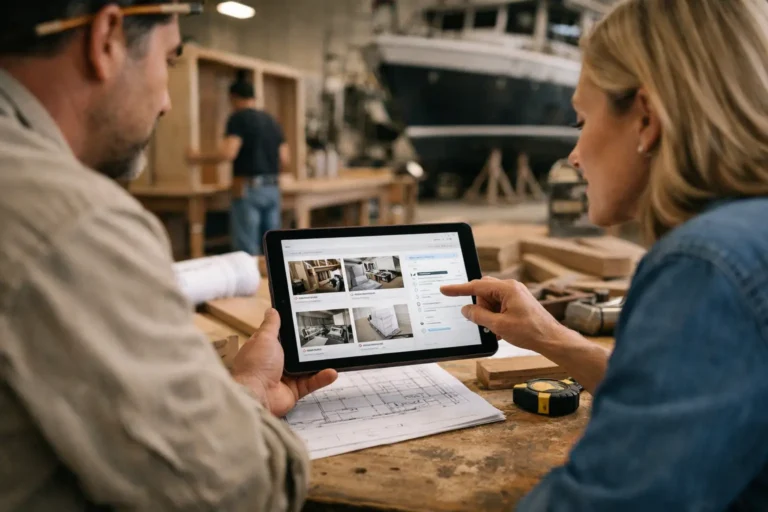
A dedicated client-facing update feed solves a narrower problem, which is exactly why it works. It creates one visible project history where the client can follow progress without searching through threads or asking your team to resend information. Photos, videos, notes, stages, changes, and delivery updates sit in one timeline.
That visibility changes the tone of the relationship. Clients feel informed before they feel anxious. Teams answer fewer repetitive questions because the answer already exists in a clear place. The business looks more organized because communication is structured, not improvised.
For companies that want this kind of visibility without turning client communication into full project management, CustomWorks is built around private project feeds and clear visual updates.
Client progress updates are also a sales and retention tool
Most companies think about updates as delivery admin. In practice, they affect referrals, reviews, and repeat business.
Clients remember how a project felt while it was happening. If communication was slow, scattered, or unclear, the final result has to work harder to overcome that experience. But when progress is visible throughout the job, clients feel more confident in the process itself. That confidence often matters just as much as the finished outcome.
This is especially true in projects with upfront payments, custom specifications, or long lead times. In those cases, trust is not built once at the point of sale. It has to be maintained over weeks or months. Regular, well-structured updates do that quietly and effectively.
Where to start if your current update process is messy
If your team is currently juggling WhatsApp photos, scattered emails, and ad hoc client calls, you do not need a complicated communication overhaul. Start by standardizing where updates live and what each update should contain.
Pick one client-facing place for project visibility. Decide who posts updates, when they are expected, and what should always be included. Keep the format light enough for site teams, workshop staff, or project managers to use without friction.
Then review your current client questions. If people keep asking about the same things, that is a signal that your updates are missing useful context. Over time, the best update process usually becomes obvious. Clients ask fewer status questions, your team spends less time repeating itself, and the full project story stays easy to follow.
The goal is not to send more communication for its own sake. It is to make progress visible in a way that feels calm, organized, and credible. When clients can see the work moving, they stop filling the silence with doubt.